Comparison
SiteHaul vs Screaming Frog
Screaming Frog is an SEO crawler that can save a screenshot of each page it renders. SiteHaul is built only for screenshots: every page of a site, at desktop and mobile sizes, full length and clean, in one run.
The short answer
If you need an SEO audit, use Screaming Frog. It's the standard tool for it, and SiteHaul doesn't audit anything. If you need screenshots people will look at, for a client, a redesign or a moodboard, SiteHaul is built for that: both sizes of every page in one run, cookie banners cleared, full length, for $49 once. Screaming Frog's screenshots need its paid license, cover one window size per crawl, and stop at 8,192 pixels.
Side by side
Checked where each tool has the advantage. Five of these go to Screaming Frog.
| Screaming Frog | SiteHaul | |
|---|---|---|
| SEO audit | 300+ checks: links, redirects, titles, canonicals and more | None |
| Screenshots | With the paid license, in JavaScript rendering mode | What it's built for, free for 10 pages a month |
| Desktop and mobile | One window size per crawl | Both sizes of every page in one run |
| Full page length | Up to 8,192px, with Resize to Content on | Up to 20,000px |
| Cookie banners and popups | No automatic handling documented | Accepted and cleared before each shot |
| Finding the pages | Crawls links, or a list or sitemap | Reads the sitemap, or a list you paste |
| Site size | Unlimited with the license, 500 URLs free | Up to 500 pages per run |
| Splits tall pages for Figma | Not listed | Optional, at 4096px |
| Page copy | Plain text export, or Markdown with custom JavaScript | Markdown for every page, with the license |
| Pages behind a login | Basic auth free, form login with the license | Basic auth, site login and page passwords |
| Scheduling and automation | Scheduled crawls, command line, headless mode | No |
| Price | £199 ($279) a year per person | 10 pages a month free, then $49 once |
| Runs on | Windows, macOS and Linux | Apple silicon Mac |
Screaming Frog details from its user guide, pricing page and FAQ, checked 30 September 2026 (SEO Spider 24.3). Its price is per person per year, and the dollar figure is its own US price. If something here has gone out of date, tell us and we will fix it.
Use Screaming Frog when
- You need an SEO audit: links, redirects, titles, canonicals.
- You're checking how Google renders your pages.
- The site is bigger than 500 pages.
- You need scheduled crawls or a command line.
- You're on Windows or Linux.
Use SiteHaul when
- The screenshots are for people: clients, designers, a moodboard.
- You need desktop and mobile of every page in one go.
- You want pages clear of cookie banners and popups.
- Pages run longer than 8,192 pixels.
- You want to drop the folder straight into Figma.
Screenshots for an audit, or to show someone
Screaming Frog's screenshots come from its JavaScript rendering. They show how a crawler sees each page, which is exactly what an audit needs. They're taken at one window size per crawl, Googlebot Smartphone unless you change it, so desktop and mobile means two crawls. You find them in the Rendered Page tab and export them from Bulk Export.
SiteHaul's screenshots are the product. Every page comes out full length at 1440 and 390 pixels wide in one run, with cookie banners accepted and popups and chat widgets cleared, each file named from its URL. Long pages can be split into slices Figma takes at full resolution.
If you already pay for Screaming Frog, keep it for audits. SiteHaul is $49 once for the screenshots you'd put in front of a client.
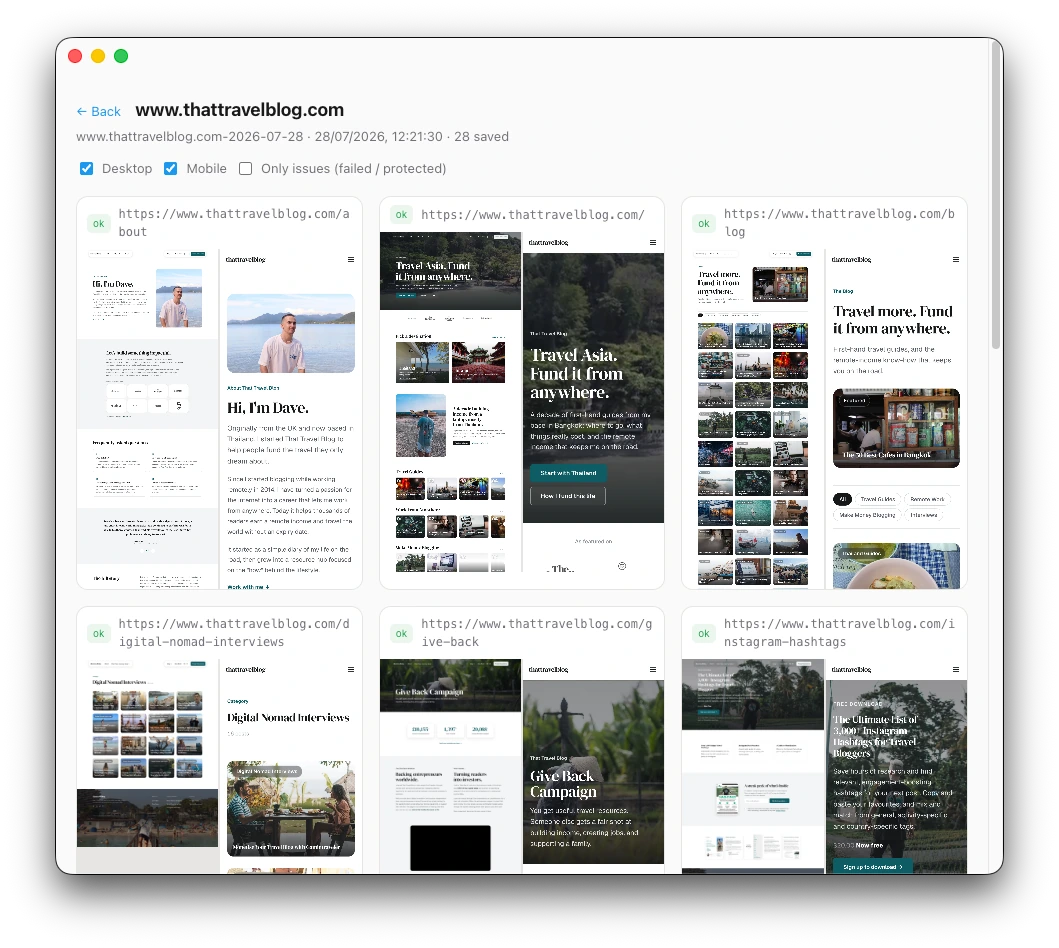
“I used to spend hours each week screenshotting webpages in a messy workflow. Now I use SiteHaul and it’s so much quicker!”
Questions
Can Screaming Frog take full-page screenshots?
How do I export screenshots from Screaming Frog?
Do I need Screaming Frog's paid license for screenshots?
Can Screaming Frog screenshot desktop and mobile at once?
I already have Screaming Frog. Do I need SiteHaul?
Is SiteHaul an SEO tool?
Try it on a site you know
10 pages a month free, which is enough to try it on a real site. No account, nothing uploaded. Keep Screaming Frog for audits.
Apple silicon · macOS 12 or later · Notarized by Apple.
See everything SiteHaul does →Also compared: SiteHaul vs GoFullPage · SiteHaul vs Stillio